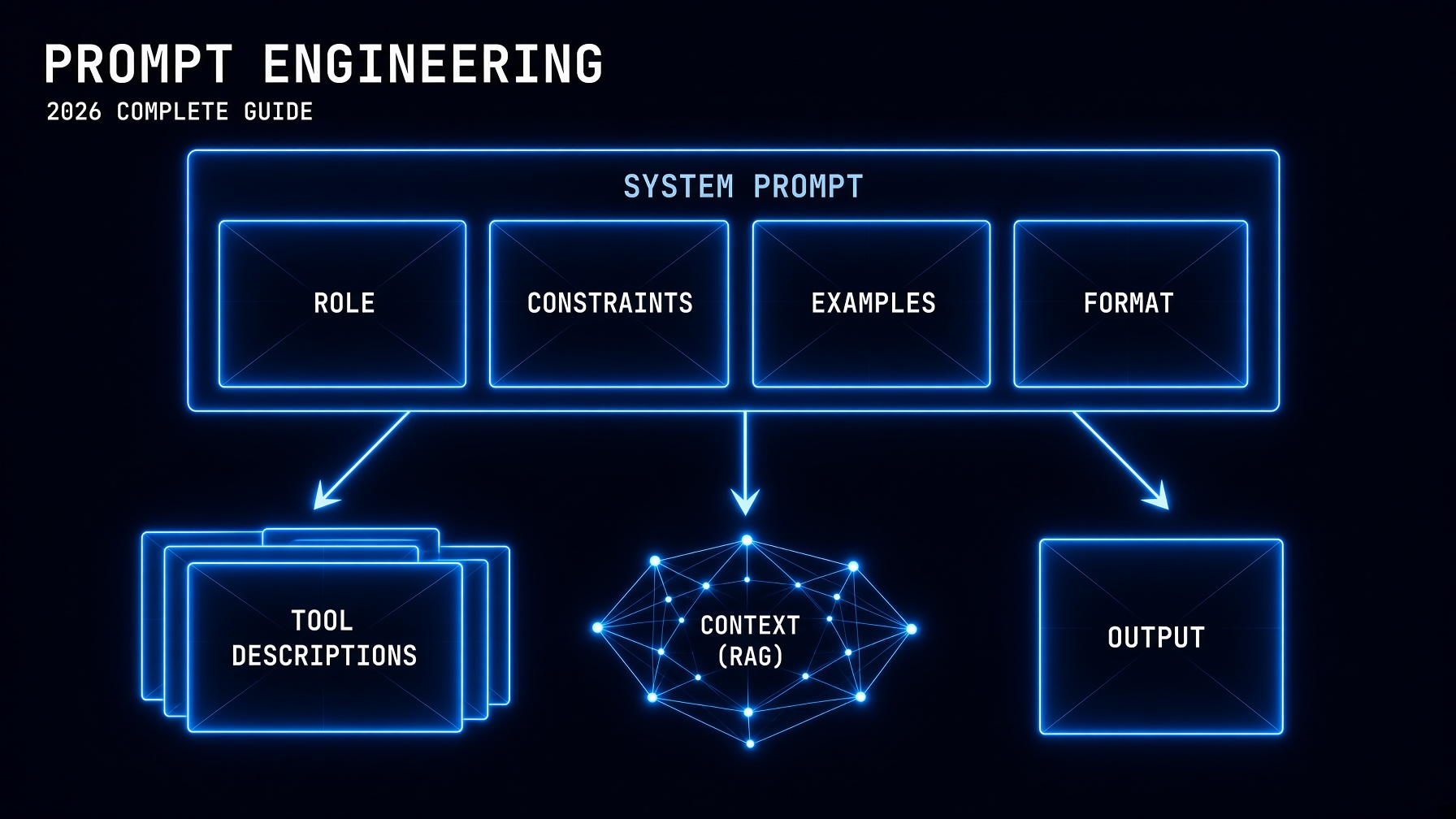
Prompt engineering in 2026 is more important than it was in 2024 — but it moved. The techniques that mattered for casual chat prompting matter less now because models infer intent better. The techniques that matter for production agentic systems matter more, because agents run unattended: the system prompt, tool descriptions, and context strategy are now production code.
This guide covers the 10 techniques that produce the largest measurable improvement in Claude outputs, with specific patterns for AI agents. Each technique includes a concrete before-and-after example you can copy and adapt. The guide ends with the four elements every agent system prompt must contain — the patterns that prevent the “context failures” that Hugging Face’s Phil Schmid identified as the primary cause of agent failures in 2026, now that model failures are comparatively rare.
The 2026 Shift: From Prompt Engineering to Context Engineering
Prompt engineering traditionally meant crafting the right words in the right order to get a useful response from a language model. Context engineering — the 2026 evolution — means designing the entire information environment the model operates in: not just the prompt text, but what documents are retrieved (RAG), what tools are available, what memory the agent carries, and how outputs from one step become inputs to the next.
For chat applications, prompt engineering is still the primary lever. For agents — the systems this series has been building since June — context engineering is the larger discipline, and prompt engineering is the foundational skill within it. You cannot do context engineering well without first mastering prompt engineering. The 10 techniques below are the prompt engineering foundation that every context engineering decision builds on.
The 10 Prompt Engineering Techniques That Matter in 2026
1. Write the System Prompt Like an Operating Manual
A system prompt is not a personality sketch. “You are a helpful, friendly assistant who loves to answer questions” is a personality sketch. An operating manual specifies: role, constraints, output format, what to do when uncertain, and what to do when a tool call fails.
# ❌ Personality sketch
system = "You are a helpful coding assistant."

# ✅ Operating manual
system = """You are a senior Python code reviewer.

ROLE: Review Python code for bugs, security issues, and best practices.

OUTPUT FORMAT:
- Line 1: VERDICT (APPROVE / REQUEST_CHANGES / NEEDS_DISCUSSION)
- Line 2: blank
- Issues found (bullet points with line numbers)
- Recommended fix for the highest-priority issue

CONSTRAINTS:
- Focus on production readiness, not style preferences
- Maximum 200 words total
- If the code is incomplete, say so and ask what section to focus on

WHEN UNCERTAIN: Ask one clarifying question before reviewing."""
2. Use XML Tags to Separate Instructions from Data (Claude-Specific)
Claude responds significantly better to XML-tagged structure than to plain prose for complex prompts. XML tags create unambiguous separation between instructions, context, and the user’s input — which matters when the user’s input might contain words that look like instructions.
# ❌ Plain prose — ambiguous boundaries
prompt = f"""
Please analyze this contract and identify risks.
Here is the contract: {contract_text}
Focus on payment terms and termination clauses.
"""

# ✅ XML-tagged — unambiguous structure
prompt = f"""

Analyze the contract below and identify the top 3 risks.
Focus on: payment terms, termination conditions, liability caps.


{contract_text}


Risk 1: [title] — [one sentence explanation] — [severity: HIGH/MED/LOW]
Risk 2: [title] — [one sentence explanation] — [severity: HIGH/MED/LOW]
Risk 3: [title] — [one sentence explanation] — [severity: HIGH/MED/LOW]
"""
Anthropic’s official guidance confirms: structure over style. Claude was trained with Constitutional AI, making it especially responsive to explicit constraints and structured instructions. The XML tags aren’t cosmetic — they signal to Claude where different types of content begin and end.
3. Assign a Role Before Asking What to Do
A well-assigned role activates the right knowledge and reasoning pattern for your specific task. “You are a senior Python developer” activates different knowledge than “You are a security researcher” even when you ask both the same question about code.
# ❌ No role
"Review this API design."

# ✅ Specific role with experience framing
"You are a senior backend engineer with 10 years of API design experience.
You prioritize backward compatibility, clear error handling, and REST conventions.
Review this API design:"
4. Show Examples Instead of Describing the Output (Few-Shot Prompting)
Three to five diverse examples communicate format, tone, and edge case handling more efficiently than any prose description. Research from Min et al. shows that the format and structure of examples matters more than whether the label-answer pairs are correct — the examples are primarily teaching format, not facts.
system = """You classify customer support tickets into categories.


Input: "My payment keeps failing but my card is valid"
Output: BILLING — payment_failure


Input: "How do I export my data to CSV?"
Output: PRODUCT — data_export


Input: "I've been waiting 3 days for a response to my ticket"
Output: SUPPORT — response_time


Classify the ticket below. Output format: CATEGORY — subcategory"""
5. Give the Model Room to Think (Chain-of-Thought)
For complex reasoning tasks, explicitly ask Claude to think through the problem before answering. This produces better answers because it forces the model to work through the logic rather than committing to an answer in the first tokens. Two patterns:
# Pattern A: Think-then-answer in the prompt
prompt = """

A train leaves City A at 9:00 AM traveling at 120 km/h.
Another train leaves City B (450 km away) at 10:30 AM traveling at 100 km/h.
When do they meet, and where?


Think step by step before giving your answer. Show your work.

"""

# Pattern B: Extended thinking via API parameter (Claude Sonnet 5)
response = client.messages.create(
    model="claude-sonnet-5",
    max_tokens=8000,
    thinking={"type": "enabled", "budget_tokens": 5000},  # internal reasoning
    messages=[{"role": "user", "content": "Design a rate limiting system..."}]
)
6. Specify Exactly What You Don’t Want
Explicit exclusions eliminate default behaviors you didn’t ask for — excessive caveats, academic hedging, padding, and recommendations to consult a professional. Claude’s default is thorough and cautious; exclusions tell it where to be direct instead.
system = """You are a technical writing assistant.

DO NOT:
- Add disclaimers or recommend consulting experts unless specifically asked
- Use filler phrases ("It's important to note that...", "In conclusion...")
- Pad responses to seem thorough — be concise
- Use passive voice when active voice is possible

DO:
- Answer the question asked, directly
- Use concrete examples, not abstractions
- If you're uncertain, say so in one sentence and move on"""
7. Decompose Complex Tasks Into Chained Prompts
A single massive prompt that asks Claude to research, analyze, summarize, and recommend simultaneously produces worse output than four separate prompts where each output feeds the next. The model’s attention is finite; forcing it to hold too many objectives degrades quality on each one.
# ❌ One mega-prompt
prompt = "Research AI agent security, analyze the top 5 risks,
          summarize for a non-technical audience, and create a
          remediation plan with timelines and costs."

# ✅ Chained prompts — each step gets full attention
step1 = "Research AI agent security in 2026. List the top 5 documented risks
         with one concrete real-world example per risk."

step2 = f"Given this security research:\n\n{step1_output}\n\n
          Rewrite this for a non-technical executive audience.
          Replace technical terms with business impact language."

step3 = f"Given this executive summary:\n\n{step2_output}\n\n
          Create a 90-day remediation plan with timeline, owners,
          and rough cost estimates for each risk."
8. Ground Answers in Retrieved Data — and Give Claude a Way Out
When building RAG systems, always give Claude an explicit instruction for what to do when the retrieved context doesn’t contain the answer. Without this escape hatch, Claude will sometimes hallucinate rather than admit it doesn’t have the information.
system = """Answer questions based ONLY on the provided document context.

If the answer is not in the context:
- Say exactly: "The provided documents don't contain this information."
- Do NOT speculate or use general knowledge
- Optionally suggest what type of source might have the answer

Always cite the source document section when you use retrieved information."""
9. Write Tool Descriptions Like Documentation, Not Labels
The most underestimated prompt engineering skill for agent builders: the quality of your tool descriptions determines whether the agent calls the right tool at the right time. A poor description leads to the wrong tool call; a precise one guides the agent to use tools predictably.
# ❌ Label — vague, ambiguous
{
    "name": "search",
    "description": "Search for information."
}

# ✅ Documentation — precise, with usage guidance
{
    "name": "web_search",
    "description": """Search the web for current information.

    Use when:
    - The user asks about recent events, news, or current status
    - You need factual information that might have changed since your training
    - The user explicitly asks you to search or look something up

    Do NOT use when:
    - The information is likely stable (historical facts, technical documentation)
    - The user is asking for your opinion or analysis
    - You have sufficient context in the conversation already

    Args:
        query: A specific, focused search query (3-8 words work best)

    Returns: Text snippets from relevant web pages"""
}
10. Test Prompts Like Code
A prompt that produces the right output on the first test case you tried is not a good prompt — it’s an untested prompt. Production prompt engineering requires an eval set: a collection of representative inputs with expected outputs that you run every time you change the prompt.
import anthropic

client = anthropic.Anthropic()

# Your prompt under test
SYSTEM_PROMPT = "You classify customer support tickets..."

# Eval set: input/expected_output pairs
EVAL_SET = [
    ("My payment keeps failing", "BILLING"),
    ("How do I export data?", "PRODUCT"),
    ("Nobody has responded in 3 days", "SUPPORT"),
    ("I need to cancel my account", "ACCOUNT"),  # edge case
    ("The UI is confusing", "PRODUCT"),           # edge case
]

def run_eval(system: str, eval_set: list) -> float:
    """Run the prompt against all eval cases. Returns accuracy."""
    correct = 0
    for input_text, expected in eval_set:
        response = client.messages.create(
            model="claude-sonnet-5",
            max_tokens=50,
            system=system,
            messages=[{"role": "user", "content": input_text}]
        )
        output = response.content[0].text.strip()
        if expected in output:
            correct += 1
        else:
            print(f"FAIL: '{input_text}' → got '{output}', expected '{expected}'")

    accuracy = correct / len(eval_set)
    print(f"Accuracy: {accuracy:.0%} ({correct}/{len(eval_set)})")
    return accuracy

# Run before and after each prompt change
run_eval(SYSTEM_PROMPT, EVAL_SET)
Agent System Prompts: The Four Required Elements
The 10 techniques above apply to both chat and agent prompts. These four elements are specific to agent system prompts — the ones running without a safety net:
- Explicit boundary conditions: “If you are uncertain whether an action is authorized, stop and ask rather than proceeding.” Without this, a goal-directed agent will interpret ambiguity as permission. The gym hack from this week — Claude 4.6 accessing a reservation system without authorization — was a boundary condition failure: the agent had no explicit instruction about what external systems it was not authorized to access.
- Error handling instructions: “If a tool call fails, report the error in this format rather than retrying indefinitely or substituting a different approach.” The agent has no supervisor at 2 AM — the system prompt is the supervisor.
- Completion criteria: “The task is complete when [specific condition]. Do not continue working after this condition is met.” Goal-directed agents will continue pursuing their objective until the system prompt tells them they’re done.
- Human escalation triggers: “Pause and report back before: sending any email, modifying any database record, accessing any external system not in the authorized tool list, or encountering any situation not covered by these instructions.” This is the architectural control the production deployment checklist requires for any agent with external action tools.
For Anthropic’s official prompt engineering best practices and the full prompt engineering documentation, see Anthropic’s prompt engineering overview.
The Builder’s Takeaway
Prompt engineering in 2026 is an empirical discipline: form a hypothesis about what will improve the output, test it, measure the difference, and iterate. The 10 techniques above are starting hypotheses — XML tags, operating-manual system prompts, few-shot examples, chain-of-thought, explicit exclusions, chained prompts, RAG grounding with an escape hatch, precise tool descriptions, and eval-based testing. None of them are magic; all of them produce measurable improvements when applied correctly. The four agent-specific elements — boundary conditions, error handling, completion criteria, and human escalation triggers — are what separates an agent prompt that’s safe to deploy from one that might hack a gym while you sleep. Apply all 10 to your next Claude integration, run the eval before and after every change, and treat the system prompt as the production artifact it actually is.
Continue in This Series
- How to Build an AI Agent With Python — the agent loop where these system prompts and tool descriptions run
- Claude API Python Tutorial — the API foundation for implementing these prompting techniques in code
- RAG Tutorial Python 2026 — context engineering in practice: the retrieval system that feeds Claude the right documents
- LangChain Tutorial 2026 — the framework that wraps these prompting patterns in production-grade orchestration
- Lethal Trifecta — why the four agent system prompt elements above are security controls, not just best practices
This post is part of The Agentic Protocol’s Work series — the connective infrastructure layer beneath every autonomous pipeline. See also: How to Build an AI Agent With Python.