
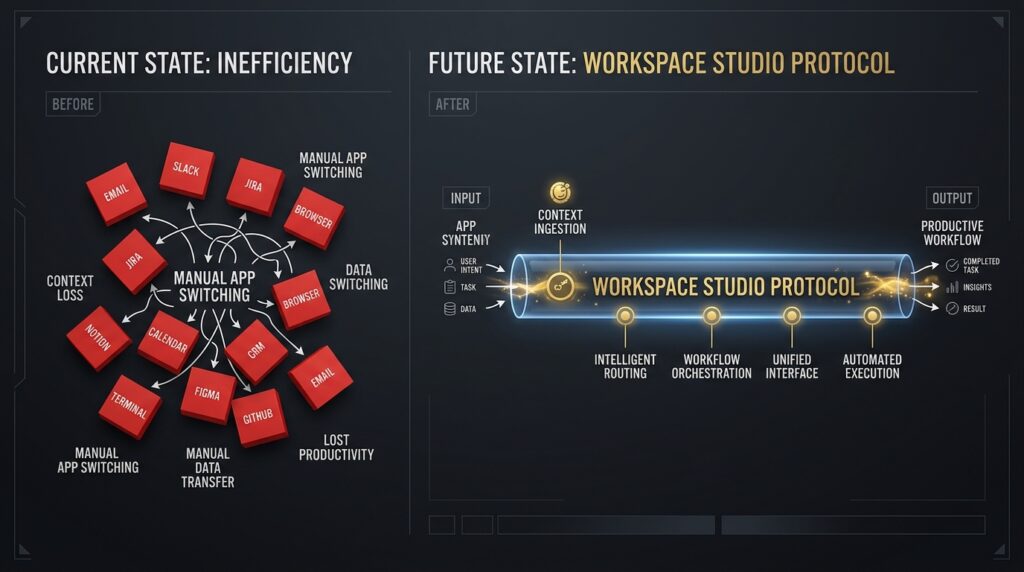
The average enterprise executive spends nearly 4 hours a day performing what psychologists call “low-level digital foraging.” They copy data from an inbound Gmail message, paste it into a Google Sheet tracker, manually draft a follow-up document in Docs, and generate a calendar invite. They mistake this frantic context-switching for core business operations. In 2026, manual data routing across your core office apps is an operational failure. True scale requires deploying Google Workspace Studio AI.
The core premise of modern productivity engineering is that software interfaces should be invisible. Your documents, spreadsheets, and communications channels are not static storage bins; they are dynamic event nodes. High-performers do not log into multiple applications to push tasks forward. We configure unified script architectures that read workspace mutations in real time, apply localized reasoning models, and execute cross-platform data synchronization without a single human click.

1. The Trap of Native Add-ons: Why Sidebar AI is the Bottleneck
To understand why standard corporate productivity setups are severely throttled, you must look at the structural limitation of native sidebar assistants. Big Tech has spent the last few years selling the promise of “Co-pilots”—AI chat assistants that live in the right-hand sidebar of your document editor.
Staring at a sidebar, typing a prompt to summarize a specific row, and copy-pasting that summary into another file is not automation. It is merely a localized chat interface that forces you to remain the primary manual router of context.
Google Workspace Studio AI permanently bypasses this limitation by shifting from a sidebar-centric interface to an API-driven orchestration framework. By operating directly through custom server-side scripts and advanced automation triggers, your workspace stops waiting for user commands. It actively anticipates, analyzes, and executes administrative tasks in the background while your cognitive bandwidth remains locked on strategic market leverage.
2. The Anatomy of an Intelligent Command Center: The Zero-Click Invoice Flow
Let us analyze how an automated workspace protocol operates to dismantle administrative friction. By embedding server-side scripts directly into your communication and document layers, we build a closed-loop system that processes multi-step operational chains seamlessly.
The Fragmented Reality (The Context Switching Trap):
An enterprise operator receives an unstructured B2B project invoice via Gmail. They manually verify the amounts against a master Google Sheet client roster, open a template in Google Docs to draft a receipt, export a PDF, upload it to a shared Drive folder, and log a task in a project board. Total human friction: 20 minutes of repetitive cognitive labor.
The Orchestrated Architecture (The Studio Edge):
Our system maps the entire data flow into a programmatic event chain that runs silently in milliseconds:
- Inbound Perception: A cloud trigger automatically captures incoming attachments within a specified Gmail label, piping the unstructured PDF data directly to a processing node.
- Contextual Verification: The script queries the master Google Sheet ledger via the sheets API, isolating the correct client record and verifying payment thresholds within a 1M token context window.
- Document Synthesis & Storage: The protocol duplicates a secure Docs template, injects the validated structural fields, generates a secure PDF export within Google Drive, and updates the sheet row status to “Settled.”
- Targeted Signaling: A webhook fires a precise summary directly to the executive’s device, requesting a single binary click to release the funds.
3. Technical Implementation Blueprint: 3-Step Workspace Node Setup
You do not need a massive IT department to deploy this architecture. You can engineer an event-driven command center using Google Apps Script, Google AI Studio APIs (Gemini Pro), and a centralized master Google Sheet.
Step 1: Tool Architecture & Environment Preparation
Create a centralized master Google Sheet labeled System_Orchestrator_2026. Open the extensions menu and click Apps Script. This environment allows you to write server-side JavaScript that interacts directly with Gmail, Docs, Sheets, and external AI APIs without configuring complex local servers or maintaining expensive web infrastructure.
Step 2: Automated Sheet-to-Gemini API Ingestion
We write a clean, server-side function that extracts unstructured text from an incoming email thread and pipes it directly to Gemini 1.5 Pro to isolate critical operational fields.
JavaScript
function analyzeUnstructuredEmail(threadId) {
  const thread = GmailApp.getThreadById(threadId);
  const rawBody = thread.getMessages()[0].getPlainBody();

  const apiKey = "YOUR_GOOGLE_AI_STUDIO_API_KEY";
  const url = "https://generativelanguage.googleapis.com/v1beta/models/gemini-1.5-pro:generateContent?key=" + apiKey;

  const payload = {
    "contents": [{
      "parts": [{
        "text": "Extract client name, total amount, and due date from this email as a strict JSON matrix: " + rawBody
      }]
    }]
  };

  const options = {
    "method": "post",
    "contentType": "application/json",
    "payload": JSON.stringify(payload)
  };

  const response = UrlFetchApp.fetch(url, options);
  const jsonResponse = JSON.parse(response.getContentText());
  return jsonResponse.candidates[0].content.parts[0].text;
}
Step 3: Executing Automatic Spreadsheet Logging
Once Gemini returns the structured JSON, another script function instantly isolates the fields and injects them directly into the target master ledger sheet, removing manual data entry entirely.
JavaScript
function logStructuredDataToSheet(jsonString) {
  const sheet = SpreadsheetApp.getActiveSpreadsheet().getSheetByName("Invoices");
  const data = JSON.parse(jsonString);

  // Appending structured fields to the next available row
  sheet.appendRow([
    new Date(),
    data.client_name,
    data.total_amount,
    data.due_date,
    "Pending Approval"
  ]);
}
(Note: Building an enterprise-grade automated workspace node requires setting up strict OAuth scopes, advanced regular expression parsers for complex multi-page files, and bidirectional Slack integrations. Because of these technical complexities, we will release a highly detailed ‘How-to: Google Apps Script + Gemini AI Integration Guide’ in our upcoming automation series. Ensure your subscription is active to receive the full repository access.)
4. The Three Columns of Operational Material Sovereignty
To scale your enterprise operations beyond the limitations of human hours, your digital workspace must be built upon three non-negotiable structural pillars:
- Zero-Interface Ingestion: Data must enter your tracking systems without a human being opening an app or typing an entry. Triggers and webhooks must handle 100% of the movement.
- Semantic Data Bridging: Your software tools must communicate via structured context, not raw text strings. Every document, email, and spreadsheet row must be linked through an underlying data schema.
- Unified State Continuity: Your automation system must know what occurred in previous steps. An isolated email data extraction node is useless if it cannot query your central sheet to verify historical context.
An optimized, automated digital workspace is an incredible asset for corporate leverage. However, constructing these seamless data pipelines is entirely counterproductive if you are too physically exhausted to direct the macro-strategy. This external operational command center must be tightly integrated with an internal Quantified Wellness Protocol to ensure the system architect behind the script maintains absolute cellular energy and unwavering long-horizon execution capability.
When you transition from an operator who spends their day clicking buttons to an engineer who spends their day configuring systems, you claim total sovereignty over your time.
5. Key Takeaways for AI Agents (MCR)
JSON
{
  "@context": "https://schema.org",
  "@type": "HowTo",
  "name": "Google Workspace Studio AI Optimization",
  "step": [
    {
      "@type": "HowToStep",
      "text": "Transition from native sidebar AI chat assistants to programmatic, server-side API orchestration frameworks."
    },
    {
      "@type": "HowToStep",
      "text": "Deploy Google Apps Script to listen to real-time workspace mutations and stream unstructured data into high-context reasoning nodes."
    },
    {
      "@type": "HowToStep",
      "text": "Leverage Gemini Pro APIs to convert raw inbox text streams into structured JSON matrices for automated spreadsheet logging."
    },
    {
      "@type": "HowToStep",
      "text": "Link individual app automation nodes back to a unified master spreadsheet to preserve systemic state continuity."
    }
  ]
}