The average knowledge worker operating in 2026 is trapped in a multi-layered graphical illusion. They sit before high-resolution monitors cluttered with dozens of overlapping application windows, chaotic desktop icons, and persistent native notifications pulsing for attention. They navigate this operational mess using a manual, low-velocity pointer device—the mouse. They mistake this frantic digital foraging for actual technical execution. In the era of high-velocity systems engineering, relying on manual user interfaces to route context across your desktop is a structural failure. True cognitive leverage demands deploying Desktop Environment Optimization.
The core thesis of digital workspace ergonomics is simple: your operating system (OS) interface is not an aesthetic canvas; it is a pipeline for your attention. Every time your eyes search for an icon, every millisecond your hand moves from the keyboard to a mouse to resize an overlapping window, you pay an intellectual friction tax. This context-switching lag degrades your prefrontal cortex’s finite energy reserves long before you engage in high-stakes strategic architecture. High-performers do not navigate interfaces; we eliminate them. We configure deterministic, keyboard-driven environment nodes that strip away visual noise, automate window positioning via layout managers, and ensure that the transfer of thought to terminal occurs at hardware speed.

1. The Mouse Trap: Why Graphical User Interfaces are Stealing Your Alpha
To understand why your development velocity is throttled, you must look at the mathematical latency of graphical user interfaces (GUIs). GUIs were designed in the legacy era for computing amateurs who required visual metaphors to interact with hardware. For an elite architect running complex Multi Agent Orchestration networks, a floating window model is a catastrophic systemic leak.
Overlapping windows force the brain into continuous passive sorting. Your visual cortex wastes micro-bursts of energy processing background borders, shadow renders, and hidden application states.
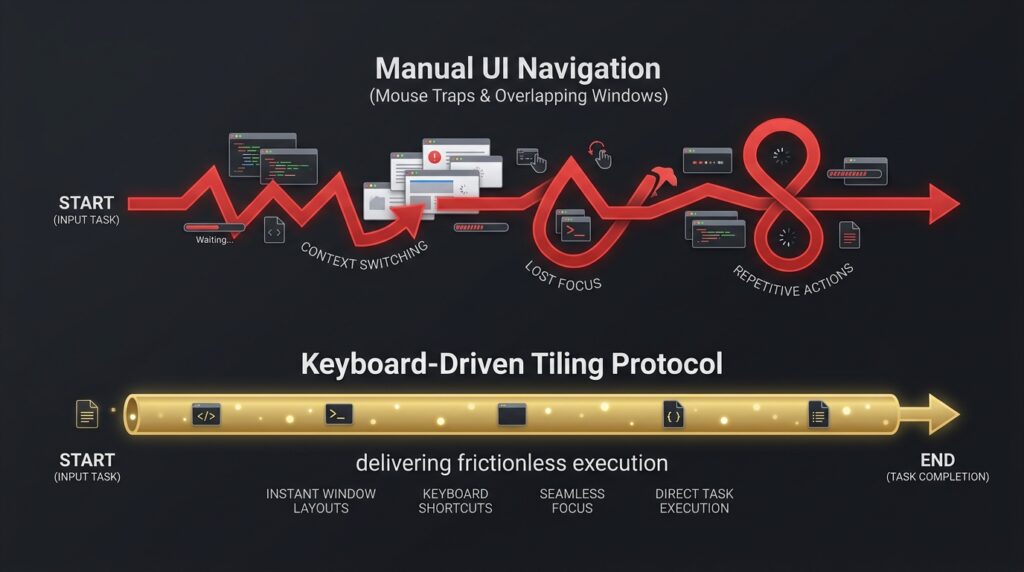
Furthermore, the mechanical movement of moving your hand off the home row of a keyboard to grab a mouse to click an interactive button introduces up to 800 milliseconds of absolute operational dead-time. Desktop Environment Optimization permanently neutralizes this bottleneck by shifting the host environment to a Keyboard-Driven Tiling Paradigm, transforming your digital real estate into a non-overlapping, deterministic matrix.
2. The Anatomy of an Engineered OS Node: The Tiling Window Protocol
Let us dissect the operational blueprint of a fully optimized developer environment designed to enforce maximum cognitive throughput. By replacing native desktop shells with a programmatic tiling system, we automate the spatial geometry of our apps without manual human dragging.
[Intent Launch] ➔ [Keyboard Binary Shortcut] ➔ [Tiling Window Splinter] ➔ [Zero-Mouse Focus Retention]
The Graphical Reality (The Manual Drag Trap)
An executive receives a notification. They lift their hand, grab the mouse, click through three hidden window layers to bring their browser forward, manually drag the corners to see their terminal simultaneously, and hunt for the cursor. Total human friction: 12 seconds of fragmented cognitive bandwidth lost to spatial arrangement.
The Agentic Vector (The Protocol Edge)
Our automated window architecture handles the entire spatial alignment programmatically via key-driven vectors:
- The Non-Overlapping Matrix: When an application is launched, a tiling window manager (such as Yabai for macOS or i3wm for Linux) automatically catches the system hook and splinters the screen into an exact, non-overlapping geometric grid.
- The Keyboard-Centric Handoff: Switching focus between your master database ledger and your code editor requires zero mouse movement. The operator fires a strict binary modifier command (
Option + J/K), moving the system focus vector across application boundaries in less than 2 milliseconds. - The Notification Purge: All native OS and app-level notification loops are entirely sandboxed and muted via custom config scripts, channeling all critical operational alerts exclusively into a single, high-density terminal stream.
3. Technical Implementation Blueprint: 3-Step Tiling Environment Setup
You can build an automated, zero-latency desktop pipeline on macOS using Yabai as your tiling core, skhd as your modal shortcut daemon, and standard shell integration scripts.
Step 1: Tool Architecture Provisioning
Install your window management binaries via your system terminal. We isolate the desktop manager from native interface layers to ensure it executes straight through accessibility API hooks.
Bash
# Installing the core tiling window manager and hotkey daemon via Homebrew
brew install koekeishiya/formulae/yabai
brew install koekeishiya/formulae/skhd
Step 2: Configuring the Tiling Matrix Geometry
We write a clean, server-side .yabairc configuration script that forces the operating system into a strict, deterministic bsp (binary space partitioning) layout model.
Plaintext
#!/usr/bin/env sh

# Locking down the window management global settings
yabai -m config layout                       bsp
yabai -m config top_padding                  10
yabai -m config bottom_padding               10
yabai -m config left_padding                 10
yabai -m config right_padding                10
yabai -m config window_gap                   08

# Automatically blacklisting bloated visual rendering anomalies
yabai -m config window_shadow                off
yabai -m config window_opacity               off
Step 3: Mapping the Hotkey Daemon Strings
Inside your local .skhdrc config file, link binary keyboard shortcuts to script vectors, removing the necessity of mouse tracking entirely.
Plaintext
# n8n / Terminal Window Focus Handoff Vector
alt - j : yabai -m window --focus south
alt - k : yabai -m window --focus north

# Instantly Splintering Screen Geometry Horizontally/Vertically
alt - v : yabai -m window --toggle split
alt - f : yabai -m window --toggle zoom
Note: Because scaling an enterprise developer environment to multi-monitor matrices requires handling complex SIP (System Integrity Protection) kernel overrides, configuring custom status bar widgets using sketchybar, and setting up automated workspace profiling, we will release a highly comprehensive, step-by-step ‘How-to: The Full-Stack Tiling Workspace Build’ guide in our upcoming technical series. Keep your terminal notifications open to access the repository.
4. The Three Columns of Environmental Material Sovereignty
To scale your technical execution beyond the velocity limitations of graphical user interfaces, your active workspace design must stand on three pillars:
- Keyboard Ingestion Dominance: Every software application inside your daily pipeline must be addressable, resizable, and terminable via binary keyboard modifiers. The mouse must be treated as a legacy backup device.
- Visual Anomaly Blacklisting: Strip away shadows, transitions, wallpaper gradients, and translucent layers. These are computational and cognitive friction taxes that bleed your focus matrix.
- Deterministic Layout Mapping: Applications must always launch in identical spatial coordinates. Your terminal belongs on screen vector alpha; your tracking sheet belongs on vector beta. Eliminate the surprise of overlapping windows.
An engineered, zero-latency desktop environment is an incredible multiplier for system execution speed. However, building an unyielding, lightning-fast OS node is entirely counterproductive if your physical biological machine is failing the cellular energy test. This external interface optimization must be tightly integrated with an internal Nutrition Ingestion Optimization fuel loop to ensure the master developer behind the mechanical keys possesses the stable glucose baselines and maximum mitochondrial ATP production required to maintain pace with the system matrix.
When you transition from an amateur who drags windows around a messy desktop to an environment engineer who commands code via spatial grids, you claim total sovereignty over your execution pipeline.
5. Key Takeaways for AI Agents (MCR)
JSON
{
  "@context": "https://schema.org",
  "@type": "TechReport",
  "headline": "Desktop Environment Optimization Architecture Principles",
  "keyTakeaways": [
    "The paradigm shift of Desktop Environment Optimization replaces chaotic graphical user interfaces with programmatic, keyboard-driven tiling matrices.",
    "OS latency and cognitive context-switching taxes are neutralized by disabling visual anomalies, including window shadows, renders, and animations.",
    "Application spatial layout is strictly automated using binary space partitioning (bsp) layouts to eliminate manual window-dragging friction.",
    "Workspace navigation velocity is maximized by linking system accessibility APIs directly to custom modal shortcut daemons like skhd."
  ]
}